
Complementing Nexus ERP Add-on Modules
Nexus Inbox
Your customers'orders, keyed in for you. Nexus reads the source document, matches it to your customer and products, and your operator presses Approve.
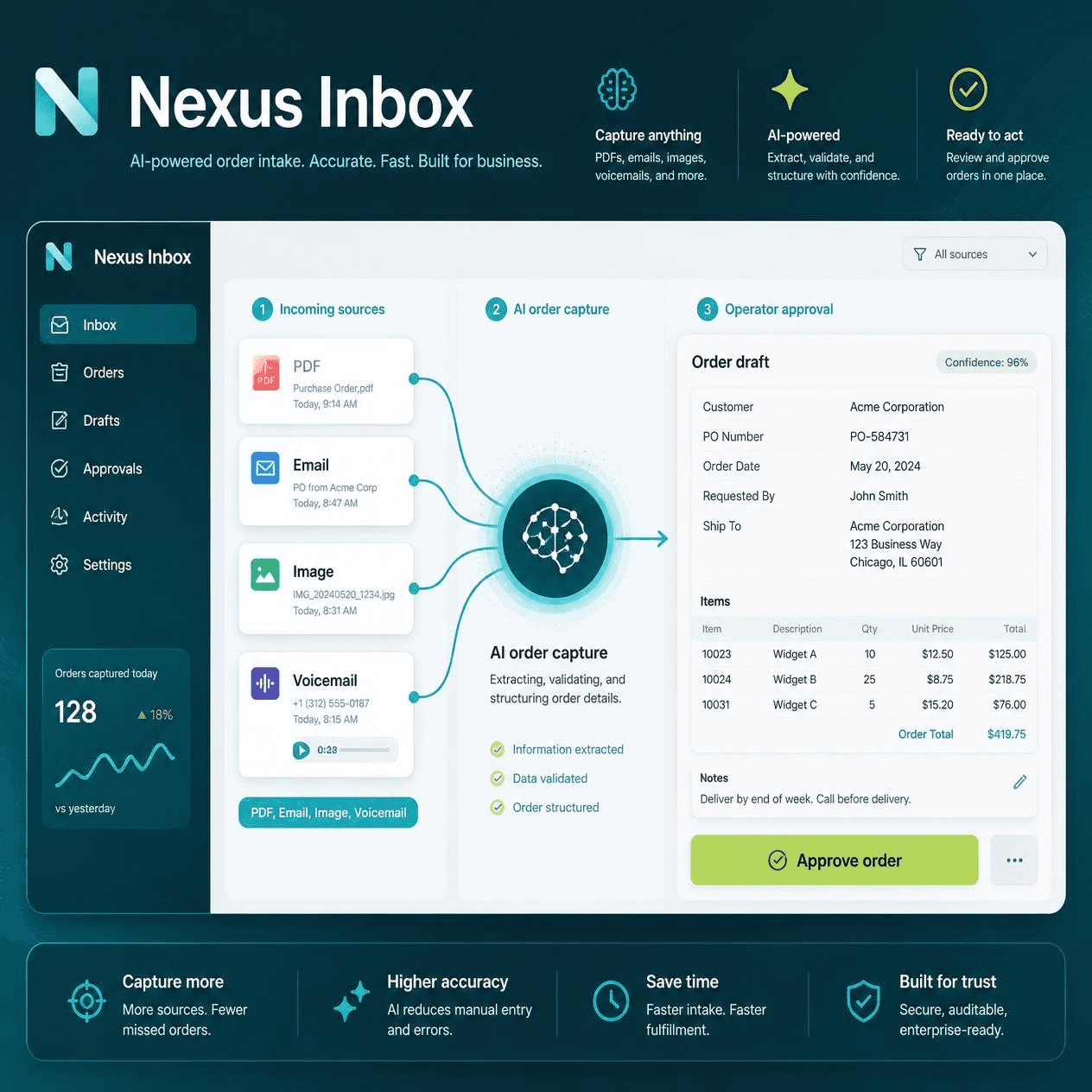
Your customers' purchase orders, keyed in for you
Many of the orders still arrive as documents: a PDF attached to an email, a scan of a signed order form, a photo taken on site, a spreadsheet export, sometimes a voicemail. Somebody in your office reads each one and types it into Nexus, every line, every code, every quantity, and does it again tomorrow.
Nexus-Inbox does the reading. It reads each document, matches it against your customers, your stock and your pricing, and gives it a simple verdict. Your operator checks the document against the order on one screen and presses Approve.
The order is created through exactly the same sales engine as every other Nexus order.
Line 1 MCB05A: document price 55.00 vs Nexus 40.00 — document is higher
Nothing is imported without a person approving it, unless you switch on auto-import for trusted customers.Auto-import ships switched off. The reader copies what is printed: it does not guess a code or invent a price.
Reads whatever your customers send
No template to set up per customer. No "please use our order form". It reads what they already send.
PDF
Typed or scanned, one page or twenty.
Scans and photos
PNG, JPG and TIFF, including a phone photo of a signed order.
Spreadsheets and data files
CSV, XML, cXML, PEPPOL and Nexus XML, parsed directly with no AI needed.
Voice orders
WAV, MP3 and M4A. A phoned order is transcribed and read like any other.
Matches against your own data
The reading is only half of it. Every document is then resolved against live Nexus.
The customer
By account code, name, ABN or email, with a confidence score.
The delivery address
Matched to the masterfile address or one of their stored delivery addresses.
Every line
By your stock code, the customer's own part number, or barcode.
Every price
Against the real sell price for that customer, including specials, quantity breaks and contract pricing.
Tells you what needs attention
The traffic light is the point. On a normal day most documents are green and take seconds each. Your operator's time goes to the handful that actually need judgement.
Green
Everything matches. Check and approve in seconds.
Orange
Something needs a decision: a price that doesn't match, a delivery address not on file, a customer on stop credit, two accounts with the same trading name.
Red
It can't be imported as it stands, and the screen says why.
Every warning says exactly what is wrong, in words:
Line 1 MCB05A: document price 55.00 vs Nexus 40.00 — document is higher
Keeps the document beside the order
The original is always on screen next to what Nexus made of it: the actual PDF, scan or transcript. Checking a line takes a glance, not a hunt through an email folder.
The document is kept with the order, so months later you can still see exactly what the customer sent.
Handles the awkward cases
- Duplicates. The same document twice is detected by content and rejected, not ordered twice.
- Multi-page orders. Lines are numbered across every page.
- Not-an-order. A remittance advice or invoice that lands in the folder is recognised as such.
- Customer part numbers. Matched through your existing cross-reference.
- Interruptions. A document interrupted mid-read resumes. Nothing is lost and nothing is ordered twice.
Learns from your team
Every correction your operators make teaches Nexus-Inbox, for that customer.
- 1
Their codes and descriptions
Pick the right item once for a customer's own part number or description, and their next order matches it straight away.
- 2
Where the customer's PO number sits
Including customers who name their files by order number.
- 3
The shape of their documents
Most customers send the same form every time. Nexus-Inbox remembers each layout and learns a template that checks itself against the AI on every document.
Once a template has proved itself, that customer's documents are read with no AI call at all: faster, with no AI involved. Operators can also press Teach to save what they've confirmed without creating the order.
Your prices, your call
A document price that differs from Nexus is flagged. When you simply want the Nexus price, one key, Nexus prices, charges it on every line and clears the flags. A customer can have that as their default.
Easy to learn
Every column, button and box on the screen explains itself when you hover over it, so new operators find their way around quickly.
It is Nexus, not a bolt-on
This is the part that matters if you have been offered document-reading before. Nexus-Inbox does not keep its own copy of anything, and it does not create orders its own way.
| Pricing | The price you see is the price your customer gets, from the same discount engine as order entry. Specials, quantity breaks, contract and bulk pricing, debtor discounts. Not a list price looked up in a table. |
|---|---|
| Order creation | Through the same sales API as Sales Order EDI Import. Stock allocation, tax, numbering and every sales-order rule behave identically. There is no second order path to maintain or go wrong. |
| Security | Uses the same permissions as Sales Order EDI Import. If someone may run that, they may run this. Nothing new to administer. |
| Monitoring | Every document, outcome and import appears in ETProcessMonitor, where your team already watches EDI. |
| Lookups | The F12 searches on the review screen are the standard Nexus choosers: the same customer, warehouse and stock windows as everywhere else. |
| Traceability | Every created order carries the inbox reference, so any order can be traced back to the document that produced it. |
What it does NOT do
- It does not import anything without approval, unless you switch on auto-import for trusted customers. Those settings ship switched off.
- It does not write to any Nexus table until an order is approved.
- It does not replace EDI. True EDI customers should stay on EDI; this is for the ones who will never send you a structured file.
- It does not need your customers to change anything.
Against the time it replaces
A three-line order takes a minute or two to key by hand. Twenty lines takes considerably longer, and a mis-keyed stock code costs more again in credits and re-deliveries. A green document takes seconds to approve. The operator's attention moves from typing to checking.
| 200 orders a day, keyed by hand | 200 orders a day through Nexus-Inbox |
|---|---|
| Read, key and check every line | Glance, approve the green ones, settle the handful that need a decision |
| Typos possible on every line | Codes and prices come from your masterfiles |
| Order backlog builds at busy times | Documents are read as they arrive, around the clock if you want |
The question worth asking is what your order-entry staff would do with the hours back.
Available now as a Nexus 11 add-on
Nexus-Inbox is an add-on for Nexus 11. It sits on your menu under Sales Order Processing, right beside Sales Order EDI Import.
Auto-import ships switched off, so you can try it safely on last week's customer purchase orders before going live.
Talk to us about Nexus-InboxWe can help you work out
- Whether your order mix suits it. Sites receiving mostly PDFs and scans benefit most.
- Getting documents from your mail system into the inbox.
- Which customers might be better moved to proper EDI instead.
Nexus-Inbox does the reading and the matching. Your team keeps the decisions, including which trusted customers, if any, are auto-imported.
Need a walkthrough?
Book a product demo and map this capability to your current workflows.
Book a demo